A complete review—not just an AI estimate
See the original model output, the evidence available to the clinician, the completed feedback, the Save action, and the persisted reviewed result.
Product demo · clinician review workflow
This guided demo follows the complete workflow: upload a synthetic hand-and-wrist radiograph, run the analysis, understand the estimate and supporting evidence, record the clinician’s decision, and confirm that the review was saved.
In 39 seconds, follow six numbered steps from image selection to a saved clinician review. Blue click markers show each action, while plain-language captions explain what the outputs mean and why the clinician remains in control.
See the original model output, the evidence available to the clinician, the completed feedback, the Save action, and the persisted reviewed result.
Watch the same six-step workflow as one uninterrupted browser session, including the real typing, clicks, analysis, review, and saved-result confirmation.
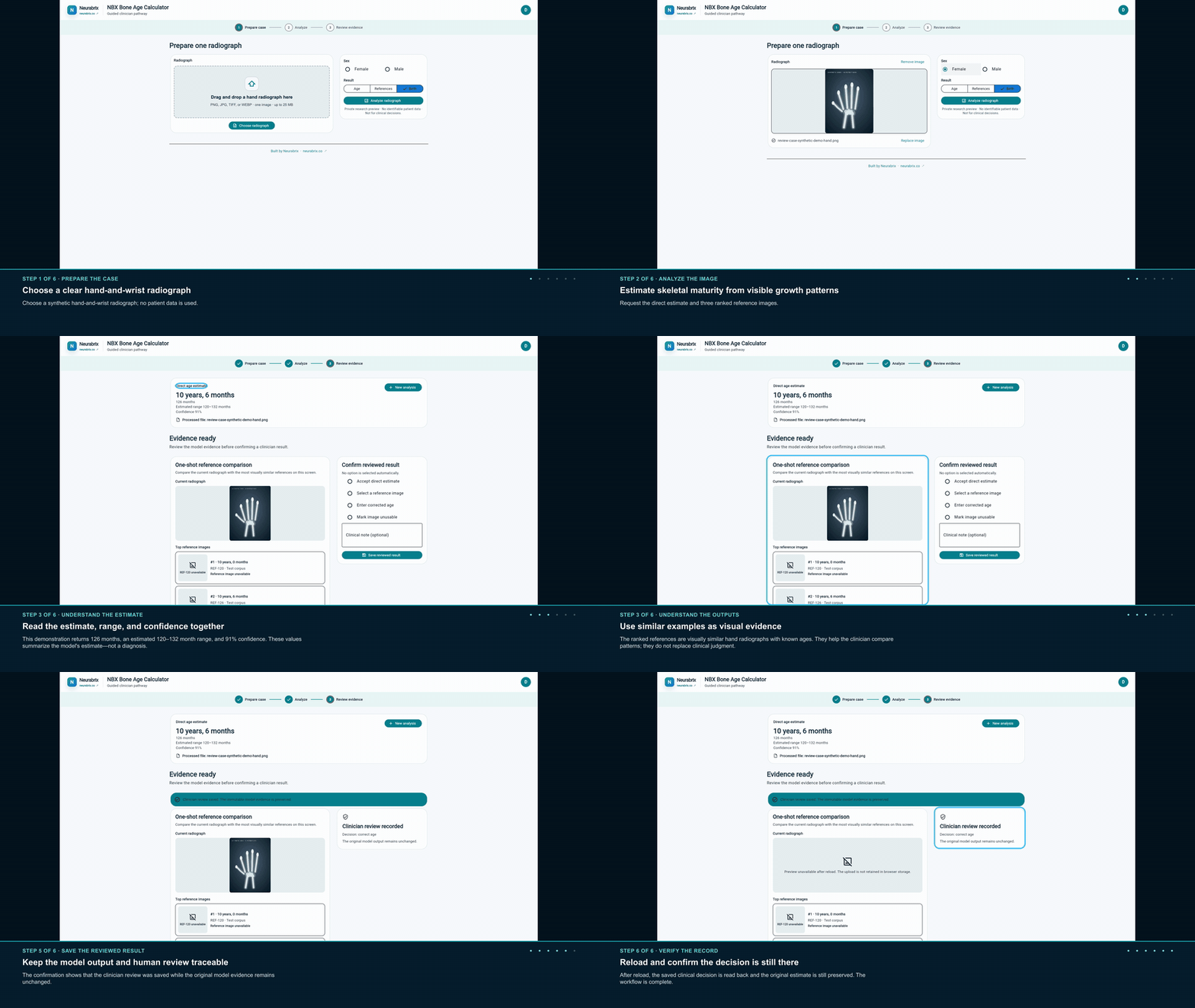
Scan the key moments in a short silent animation, then use the guided video above for the complete workflow and output explanations.
The calculator begins with secure account access. This demo starts inside the clinician workspace and uses a synthetic image and synthetic values, so no patient data appears anywhere in the walkthrough.
Choose one clear hand-and-wrist radiograph and confirm the sex used by the calculator. The example image is synthetic and contains no patient data.
Select Analyze radiograph. At a high level, the calculator reads visible growth patterns across the hand and wrist and compares them with labeled examples learned during model development.
Read the estimated age, range, and confidence together, then compare the ranked reference images. These are decision-support outputs, not a diagnosis; their meanings are explained below.
Accept the estimate, choose a reference, enter a corrected age with a reason, or mark the image unusable. The demonstration records a corrected age of 124 months.
Select Save reviewed result. The clinician decision and reason are stored separately so they do not overwrite the original model result.
Reload the page and confirm the saved decision is read back while the original estimate remains unchanged. This is the visible proof that the review was stored durably.
The calculator summarizes patterns visible in the radiograph. It does not determine a diagnosis, and the clinician remains responsible for the final review.
The estimated age is the model’s best summary of skeletal maturity, expressed in months and years. The range shows a nearby interval around that estimate, reflecting that image-based estimates are not exact.
Confidence summarizes how strongly the model supports its estimate. The ranked references are visually similar examples with known ages, provided so the clinician can compare the visible growth patterns.
The clinician can accept, correct, or reject the model result and add a reason. This human decision is saved separately from the model estimate so both remain understandable and traceable.
The current radiograph, three ranked references, estimated age, range, confidence, and disagreement reason appear in the product UI.
No review option is selected automatically. The clinician explicitly chooses and saves the decision.
After navigation reload, the saved decision is read from the API and the immutable model evidence remains separate.